Introducing Canvas dashboards — a new way to visualize metrics

We initially chose Rill for their fast operational dashboards, to monitor performance metrics of our retail media network. Now with Canvas, we’re able to create more traditional, visually customized dashboards as well. By consolidating our reporting on a single platform, we've reduced internal data discrepancies, improved the customer experience with embedded dashboards, and lowered vendor costs.
Katherine Tomlin , Director of Business Operations at Disco
Rill’s signature Explore dashboards have always had powerful slice and dice capabilities, but its layout was highly opinionated. Today we’re excited to introduce Canvas dashboards, a flexible way to arrange and visualize your metrics however you’d like.
With Canvas dashboards, you control how metrics are presented — creating layouts that are purpose-built for your teams and use cases.
Mix and match different visualization types, create your own layouts, and build dashboards that mirror the way you think about your business.
At Rill, we believe that metrics are the key building blocks of analytics, which is why our solution comes batteries-included with its own metrics layer, defined via SQL expressions. While Rill’s Explore dashboards enable users to pivot and drill into metrics — like revenue, eCPM, ARPU, transaction volume, and uptime — they do so within a prescribed layout.
Canvas provides all of the flexibility of traditional dashboards, along with the consistency of a curated metrics layer. There’s no need to build from scratch, you can quickly compose with the metrics that you’ve already created in Rill.
Craft dashboards with purpose and style
A Canvas dashboard is made up of components you can place and arrange however you want. Here's what you can add:
- Chart
- Display trends with line and bar charts. Choose your dimensions, measures, and even split by category if you’re feeling fancy.
- KPI
- Show off the big numbers that matter. Create a grid of key performance indicators from any metrics view.
- Leaderboard
- Just like in our Explore dashboards, display a grid of your top lists per category and click to quickly filter.
- Table
- Sometimes you just need the raw details. Build flat or nested tables for those deep data dives.
- Text
- Add a title, a note, a story, or a whole manifesto with markdown-powered text blocks.
- Image
- Drop in logos, diagrams, or whatever else helps bring your story to life.
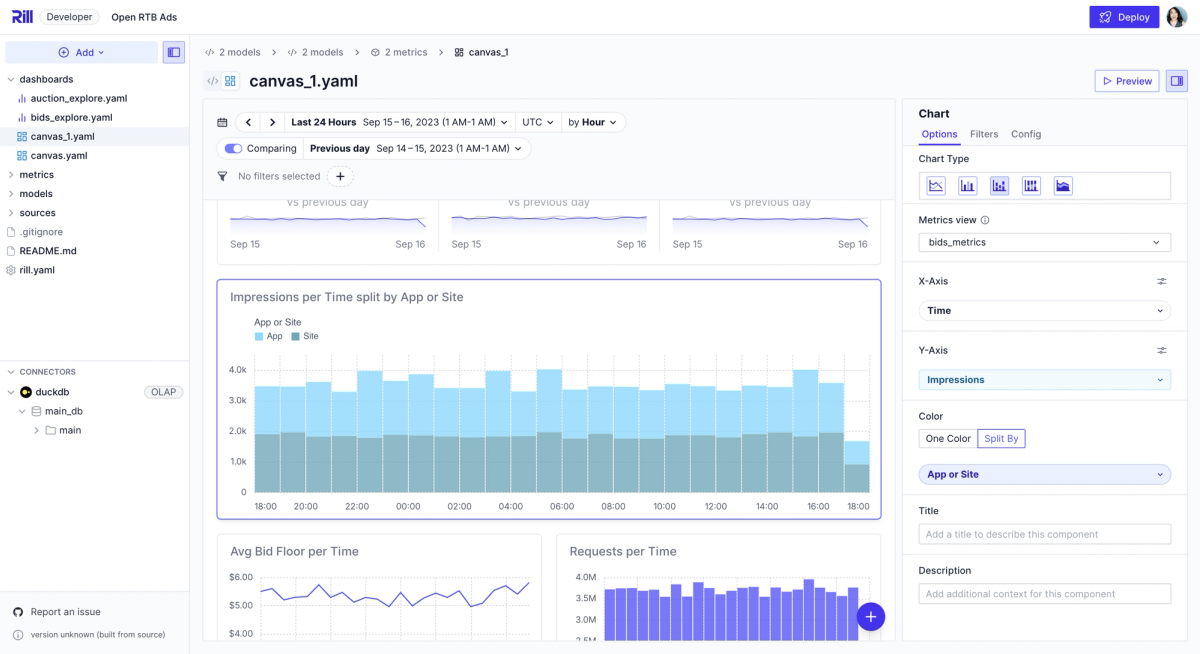
Power and flexibility, via BI-as-code
Canvas dashboards are built for speed, just like everything else in Rill. You can choose whether to edit a Canvas visually or directly in code. As we continue to build out the feature, we imagine a future state in which developers can write code snippets to insert new visualization types beyond our default options.
Link your Canvas up to multiple metrics views to keep everything in sync even as your projects grow. Then deploy them to Rill Cloud to share insights with your team.
Use Canvas dashboards to:
- Create personalized executive summaries
- Tailor dashboards for different teams
- Write up narratives alongside data to drive decision-making
- Combine data, text, and visuals into one unified experience
What’s in store for the future?
- More GenBI: AI-powered Canvas dashboard creation
- Just like our autogenerate feature for Explore, this will automatically create a starting Canvas dashboard from your metrics with a single click.
- More visualization types
- Our beta version offers bar and line charts, but keep an eye out for donut charts, heat maps, and more soon!
- Advanced custom visualizations-as-code
- You’ll be able to configure your own customized chart templates to use in your Canvas dashboards.
Ready to create something amazing?
Canvas dashboards are live now in Rill 0.60! Here are a few deployed examples of Canvas dashboards that you can check out!
- E-commerce demo dashboard
- Programmatic advertising demo dashboard
- NYC demo dashboard
- NYC party demo dashboard
Check out the docs , which includes a step-by-step tutorial video , and start building your first Canvas today.
We can't wait to see what you build! 🎨📊


